
EZ GIS ( XY GPS & Topo tool )4.0.5 - Google Play
You'll be able to see results in few seconds.
Publisher Description
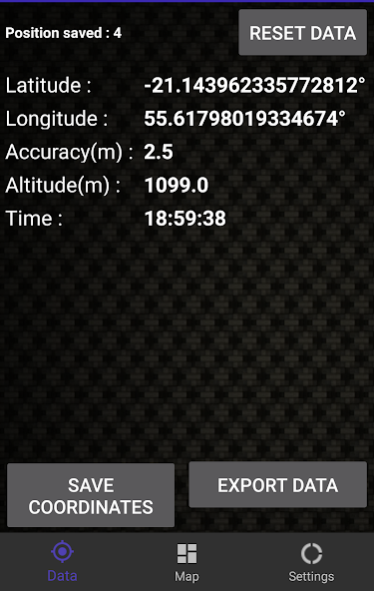

EZ GIS is the easiest application to obtain, export, and use your geographic coordinates or location, in various formats. (Latitude / Longitude, DMS Degrees Minutes Seconds, WSG83, WSG84, UTM, OSGB36) with an accuracy of up to 1 meter. Ideal for land surveyor, topographic surveying, or mapping worker.
This GIS, topographic tool, cartographic tool or location tool is compatible with QGIS , ArcGIS , GRASS GIS , gvSIG , Manifold GIS , ILWIS , JUMP GIS , MapWindow GIS , SAGA GIS , uDig , Capaware , FalconView , Kalypso , TerraView , Whitebox GAT , MapGuide , Mapnik , MapServer , PostGIS , SpatialLite , TerraLib , Cesium , GeoTools , GDAL , Orfeo toolbox , GeoNetwork , pycsw , Chameleon , MapPoint , Google Earth , Autodesk , ENVI , ERDAS IMAGINE , Esri tools , GeoServer & Excel
Localization tool / topo tool specifically developed for archaeological and geographical exploration. work on your carto, or map will become easier! use your position and your coordinate points, lat lng and more!
This location tool the new research tool for cartography, topography, map work, scaling & leveling
You can say goodbye to expensive XY GPS
The application lets you record your positions in two different ways.
First, manual mode , it leaves your hand and you need to manually retrieve your different geographical points coordinated to my demand (ideal for referencing specific areas).
Secondly, an automatic mode or tracker that tracks your movement and backup recording data every X seconds can track your movement and view them on a map (ideal for trips reference)
This location based software allows you to export files in CSV format readable in most mapping or GIS software and in KML file format that can be read directly on Google Earth,
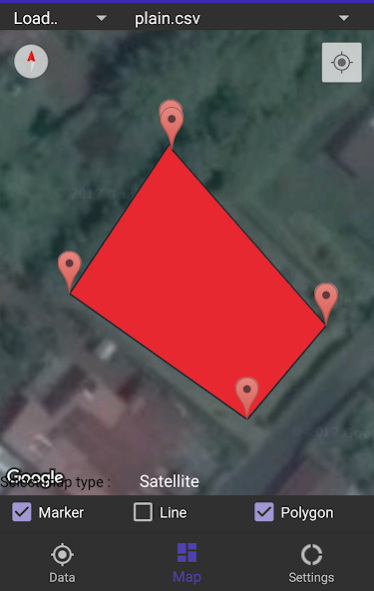
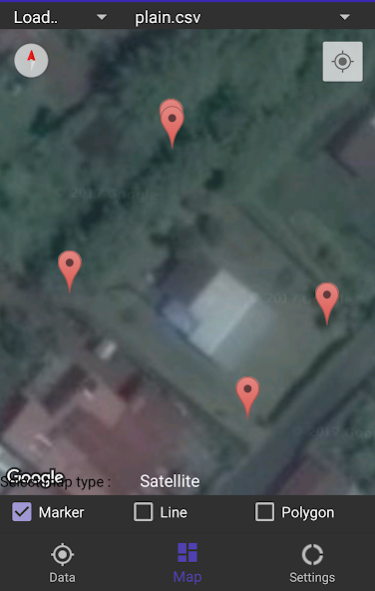
Moreover EZ GIS offers you the ability to view your plot or export your recorded movement on a map googlemaps.
The map allows to display your data in the form of polygon or line or just under marker form
Get your data and watch it live on map !
An excellent application of localisation to replace expensive GPS XY and make GIS easy
This GIS application / Carto app has been specially developed for use with maps software and GIS tools like QGIS, ESRI ArcGIS, or Manifold GIS , ArcGIS , GRASS GIS , gvSIG , Manifold GIS , ILWIS , JUMP GIS , MapWindow GIS , SAGA GIS , uDig , Capaware , FalconView , Kalypso , TerraView , Whitebox GAT , MapGuide , Mapnik , MapServer , PostGIS , SpatialLite , TerraLib , Cesium , GeoTools , GDAL , Orfeo toolbox , GeoNetwork , pycsw , Chameleon , MapPoint , GoogleEarth, Google Earth , Autodesk , ENVI , ERDAS IMAGINE , Esri tools , GeoServer & Excel to read CSV files. So what is the essential tool for your mapping archaeological surveys and geographical surveys.
WKT data or traditional
In addition, for new users QGIS, EZ GIS offers a step by step tutorial to import your data in QGIS and facilitate the use of data.
This application is going to be your best friend if you do archeological survey and/or geological survey or simply work on mapping and use CSV or KML file format.
Get your coordinates!
About EZ GIS ( XY GPS & Topo tool )
The company that develops EZ GIS ( XY GPS & Topo tool ) is Android Breizh 974 Application. The latest version released by its developer is 4.0.5.
To install EZ GIS ( XY GPS & Topo tool ) on your Android device, just click the green Continue To App button above to start the installation process. The app is listed on our website since 2017-06-09 and was downloaded 0 times. We have already checked if the download link is safe, however for your own protection we recommend that you scan the downloaded app with your antivirus. Your antivirus may detect the EZ GIS ( XY GPS & Topo tool ) as malware if the download link to com.bzh974app.ap.ezgis is broken.
How to install EZ GIS ( XY GPS & Topo tool ) on your Android device:
- Click on the Continue To App button on our website. This will redirect you to Google Play.
- Once the EZ GIS ( XY GPS & Topo tool ) is shown in the Google Play listing of your Android device, you can start its download and installation. Tap on the Install button located below the search bar and to the right of the app icon.
- A pop-up window with the permissions required by EZ GIS ( XY GPS & Topo tool ) will be shown. Click on Accept to continue the process.
- EZ GIS ( XY GPS & Topo tool ) will be downloaded onto your device, displaying a progress. Once the download completes, the installation will start and you'll get a notification after the installation is finished.
Program Details
System requirements
Download information
Pricing
Version History
version 4.0.5
posted on 2017-06-09
version 3.5.4
posted on 2016-12-20
-Add user position on map,-Improve application display,-Increase GPS accuracy & speed,-Now export CSV and KML file,-Add WGS84,-Improve stability
version 3.5.2
posted on 2016-09-25
-Improve application display,-Increase GPS accuracy & speed,-Now export CSV and KML file,-Add WGS84,-Improve stability
Disclaimer
Official Google Play Link
We do not host the EZ GIS ( XY GPS & Topo tool ) app on our servers. We did not scan it for viruses, adware, spyware or other type of malware. This app is hosted by Google and passed their terms and conditions to be listed there. We recommend caution when installing it.
The Google Play link for EZ GIS ( XY GPS & Topo tool ) is provided to you by apps112.com without any warranties, representations or guarantees of any kind, so access it at your own risk.
If you have questions regarding this particular app contact the app developer directly. For questions about the functionalities of the apps112.com website, contact us.
